
122k+ Users across all products
100+ Languages supported
Free tier No credit card needed

The problem

Why translating spreadsheets manually is a nightmare.

Spreadsheet data demands precision. Traditional translation methods can't deliver it.

01 Cell formatting destroyed

External translators strip number formats, formulas, and cell styles — creating hours of cleanup work.

02 Cell-by-cell copy-paste

Without batch support, a 500-row spreadsheet means hundreds of tedious copy-paste-translate cycles.

03 Context-blind translations

Generic translators mishandle column headers, product names, and domain-specific terminology.

Get started

Up and running in three steps.

No learning curve — install, open, and translate.

01 Install

Add AI Sheets Translator from Google Workspace Marketplace. Your Workspace admin can also deploy it organization-wide.

02 Open your spreadsheet

Open any Google Sheets spreadsheet and launch AI Sheets Translator from the Extensions menu.

03 Translate

Select cells or the entire sheet, choose your target language, and click Translate. Formatting is preserved — ready to share.

Capabilities

Everything you need for multilingual spreadsheets.

AI Sheets Translator handles the hard parts — cell formatting, styles, and accuracy — so you can focus on your data.

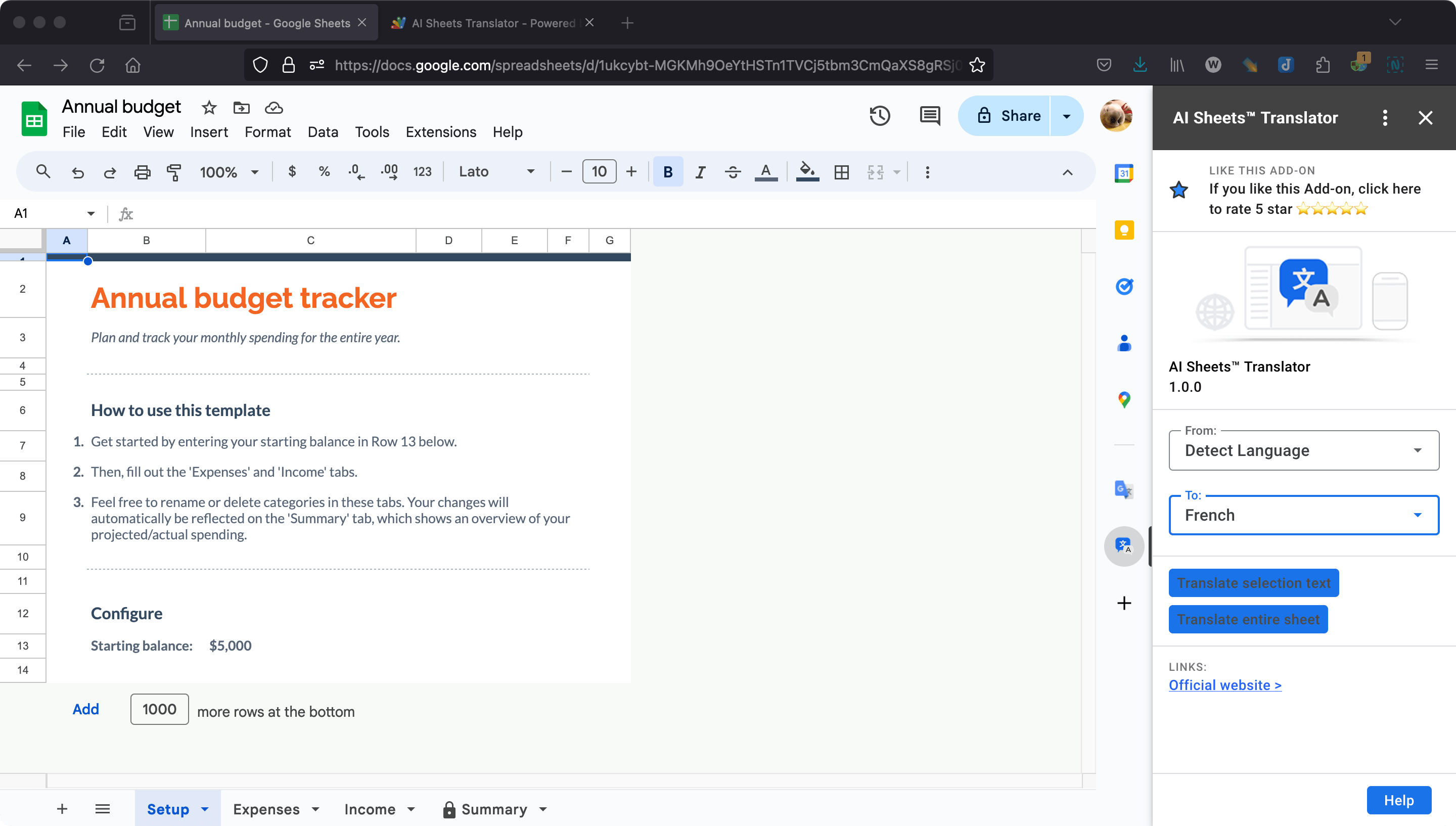
One-click translation for cells or entire sheets.

Translate a selection of cells or every cell in the sheet with one click. No need to copy text, switch tools, or manually reformat.

  • Cell-level or whole-sheet translation
  • Batch processing for large spreadsheets
  • Original cell formatting and structure preserved
AI Sheets Translator one-click translation interface

100+ languages with AI+GPT accuracy.

Powered by AI and GPT technology, translations read naturally — not like machine output. Supports 100+ languages for global teams.

  • Natural, context-aware translations
  • 100+ target languages available
  • Continually improved by AI models
AI Sheets Translator language selection panel

Formatting preserved, every time.

Cell styles, fonts, colors, bold/italic formatting, and merged cells stay exactly as they are. Translated sheets are ready to share without manual cleanup.

  • Font styles, sizes, and colors retained
  • Cell borders and merged cells untouched
  • Number formats and formulas preserved
AI Sheets Translator preserving formatting during translation

Use cases

Built for teams that manage multilingual data.

From inventory lists to survey results, AI Sheets Translator handles the translation while you manage the data.

Data Analysts

Translate survey responses and customer feedback from international markets in bulk.

  • Preserve number formats and formulas
  • Translate selected ranges or entire sheets
  • Handle large datasets efficiently
E-commerce Teams

Localize product catalogs, inventory sheets, and pricing tables for global marketplaces.

  • Keep SKUs and pricing untouched
  • Translate product descriptions in bulk
  • 100+ languages for worldwide expansion
Operations Teams

Translate internal reports, scheduling sheets, and logistics data for regional offices.

  • Deploy org-wide via Google Admin Console
  • Maintain data integrity across translations
  • Domain licensing for up to 1,000 users

Why AI Sheets Translator

How it compares to the alternatives.

Traditional translation workflows waste hours on cell-by-cell copy-pasting. AI Sheets Translator eliminates that entirely.

Capability AI Sheets Translator Google Translate + Manual Other Plugins
One-click sheet translation Partial
Preserves cell formatting
100+ languages supported Partial
AI + GPT powered accuracy Partial
Works inside Google Sheets
Enterprise / domain deployment
Free tier available Varies

See full comparison →

Security & Privacy

Your spreadsheet data stays private.

Enterprise-grade security for teams that handle sensitive data.

  • No data stored Spreadsheet content is processed in real-time and never stored on our servers.
  • No model training Your data is never used to train or improve AI models.
  • GDPR compliant Built to meet GDPR data protection requirements for European teams.
  • Enterprise deployment Workspace admins can deploy and manage across the entire organization.

Pricing

Plans for every team size.

Start free and upgrade when your translation volume grows. All plans include 100+ languages and formatting preservation.

View all pricing details →

Starter

Free

$0 / month

  • Selected cells translation: 20 times/month
  • Entire sheet translation: 1 time/month
  • 100+ languages supported
Pro

Pro

$9.9 / month

  • Selected cells translation: Unlimited
  • Entire sheet translation: Unlimited
  • 100+ languages supported
  • Email support
Enterprise

Domain License

$1999 / year

Up to 1,000 users

  • License all employees under one domain: up to 1,000
  • Selected cells translation: Unlimited
  • Entire sheet translation: Unlimited
  • 100+ languages supported
  • Email support

FAQ

Common questions about AI Sheets Translator.

Quick answers for the questions that come up most before installing.

Is AI Sheets Translator free to use?

Yes. The free plan includes 20 selected-cell translations and 1 full-sheet translation per month. No credit card is required to start. Upgrade to Pro for unlimited translations.

Can I translate selected cells instead of the entire sheet?

Absolutely. You can highlight any range of cells and translate only the selected area. This is useful when you need to translate specific columns or rows while leaving the rest untouched.

How accurate is the AI translation compared to Google Translate?

AI Sheets Translator uses AI and GPT models that produce more natural, context-aware translations than basic machine translation. The results are suitable for professional spreadsheets, reports, and data analysis.

Does the translation preserve my cell formatting and formulas?

Yes. AI Sheets Translator preserves all cell formatting — fonts, colors, borders, merged cells, and number formats. Formulas are not overwritten; only the text content within cells is translated.

Is my spreadsheet data safe and private?

Your content is processed in real-time for translation and is not stored, retained, or used for model training. Review our Privacy Policy for full data handling details.

How do I install AI Sheets Translator for my organization?

Workspace admins can deploy AI Sheets Translator organization-wide through the Google Admin Console. Individual users can install directly from Google Workspace Marketplace.

What happens if I exceed the free plan limits?

Translation will pause until the next month or until you upgrade to a Pro plan. Your existing translated content is not affected.

Read more tips on our blog →

More tools

Explore more Workspace Power Tools.

AI translation and productivity tools for Google Workspace and your browser.

AI Slides Translator Google Workspace

AI Slides Translator

Translate entire Google Slides presentations while preserving shapes, fonts, and layouts.

AI Docs Translator Google Workspace

AI Docs Translator

Translate entire Google Docs while preserving formatting, headers, and tables.

CalendarBoost Chrome & Edge

CalendarBoost

Unlimited custom colors, visual tags, and premium themes for Google Calendar.

Ready to translate your next spreadsheet?

Install AI Sheets Translator from Google Workspace Marketplace and start translating in one click. Free tier available — no credit card required.

Install from Marketplace